Showing posts with label tech. Show all posts

Tuesday, 3 December 2013

The good kind of drones

In today's City A.M. - Amazon floats plan to use drones to deliver packages:


AMAZON is preparing to make next-day delivery obsolete by using unmanned aerial vehicles, or drones, in an audacious plan to introduce 30-minute home delivery.

The online retailer hopes to revolutionise online shopping by delivering directly from its warehouses to customers’ homes using autonomous drones that can carry small packages weighing up to five pounds (2.3kg).

The main obstacle?

Bezos said the main challenge the service will face is regulatory approval for the drones to fly across the country unmanned and unmonitored by a pilot.

Current UK rules from the Civil Aviation Authority on commercial unmanned aerial vehicles require drones to always remain within sight of a human operator.

But Bezos remained undeterred by the challenges: “Could it be four, five years [away]? I think so. It will work, and it will happen, and it’s gonna be a lot of fun.”

Amazon said its Prime Air drone deliveries could take off as early as 2015 in the US.

Monday, 30 July 2012

Fixing finder

Although it is superior to Microsoft Windows in almost every way, there are some very annoying things about OSX that Apple have been slow to fix.

For over a decade, it was only possible to resize windows using the bottom right hand corner. This was finally fixed last year with 10.7 ("Lion").

Another long-standing weak point is Finder, the OSX file browser. It was unspeakably bad in 10.3 (my first version of OSX), and it has progressed only gradually.

Today I discovered that one of its most annoying features can now be fixed through a preference:


"When performing a search ... Search the Current Folder"

You'd think it would be obvious. Instead, OSX defaults to searching your entire computer!

Now if they'd just prevent windows from stealing focus, and force them to have a maximise option that really does maximise, I'll be a happy man.

Friday, 20 July 2012

0xB16B00B5

BBC News reports:

Microsoft has swiftly fixed an embarrassing gaffe which saw a chunk of code labelled "big boobs".

The hexadecimal string 0xB16B00B5 was discovered lurking in code that helps a Microsoft program work with Linux open source software.

For the BBC this couldn't possibly be a bit of harmless fun ...

"Puerile sniggering at breasts contributes to the continuing impression that software development is a boys' club where girls aren't welcome," Dr Garrett wrote.

Saturday, 2 June 2012

Google WTF!

Google, what were you thinking?


I'd just like a nice simple search screen, thank you (holiday-related adornments are superfluous but tolerable):

Tuesday, 27 March 2012

The future is bright; the future is Apple

A while back I wrote about my problems with Orange.

Reception is still terrible at home and at work (both within the Oxford ring road), despite the deal Orange struck with T-Mobile.

Thankfully, now that my wife has an iPhone 4s, we can take advantage of iMessage and FaceTime. Whereas the mobile network results in missed calls, annoying static, and text messages that refuse to send, the magic of the interwebs delivers high resolution video calls with crystal clear sound, and messages that send instantly and reliably.

How very 21st century!

Tuesday, 25 October 2011

A BMW with lasers!

Recently seen at an airport:


It turns out this is the i8 concept car. I've always been a sucker for such things, and even though this one panders to the eco-mentalists, it does look quite stunning.

Under the bonnet:
At the front axle is the electric motor adopted from the BMW i3 Concept and modified for use in the BMW i8 Concept's hybrid power train, while a 164 kW/220 hp turbocharged three-cylinder petrol engine developing up to 300 Nm (221 lb-ft) of torque drives the rear axle. Together, the two drive units take the vehicle to a governed top speed of 250 km/h (155 mph). Like the electric motor, the 1.5-litre three-cylinder petrol engine was developed entirely in-house by the BMW Group and represents the latest state of the art in conventional engine design. Acceleration of 0 to 100 km/h (62 mph) in under five seconds combined with fuel consumption in the European cycle of under three litres per 100 kilometres (approx. 94 mpg imp) are figures currently beyond the capability of any vehicle powered by a combustion engine of comparable performance.
They also claim:
all-electric driving range of approximately 35 kilometres (20 miles). The battery can be fully recharged in two hours at a standard power socket.
But what really got my attention was this:
For the first time BMW introduces as part of the BMW i8 Concept the newly developed Laser Light.
...
The intensity of laser light poses no possible risks to humans, animals or wildlife when used in car lighting. Amongst other things, this is because the light is not emitted directly, but is first converted into a form that is suitable for use in road traffic.
Finally, a car with laaaaasers!

It will be interesting to see what eventually reaches the road.

Saturday, 13 August 2011

Demingifying Lion's Address Book and iCal

I'm still greatly enjoying OSX Lion.

I've disabled the "Show Dashboard as Space" option, but have otherwise stuck largely with the defaults. "Natural" scroll now feels truly natural, and I confuse myself when using my wife's MacBook.

However, I was truly shocked the first time I opened iCal:
Much as I like The Flintstones, this isn't the sort of interface I want to work with every day.

Address Book (which use much less often) was equally hideous:


Who at Apple thought this would be a good idea? And have they been sacked?

Thankfully the blogosphere has its share of aesthetes, and one of them was good enough to hack this leathery mess into a form more concordant with the beautiful aluminium frame.


Much better!

Many thanks to MacNix.

Saturday, 23 July 2011

OSX 10.7 Lion

Yesterday I installed OSX 10.7 "Lion" on my new MacBook Pro.

The 3.5GB download went quickly enough for me on our office network, and the installation process itself was completely pain free. I'm not sure I was asked a single question. Such a change from Microsoft Windows installs of yesteryear, which would chug along for hours before requesting user input, then chug along some more!

First impressions:
  • Inverted scroll takes some getting used to, but it's intuitive enough if you have an iPhone. The correct scroll direction would be more obvious if the mouse cursor turned into a 'grab' icon when you place two fingers on the trackpad (I remember this scrolling mode from old versions of Adobe Acrobat), but they probably decided this would be too ugly.
  • I'm delighted that you can finally resize windows from any corner or side. In typical Jobsian style, there's no clumsy border to suggest that this may be possible, but the mouse cursor changes appropriately on hover. Users have had plenty of time to get used to window-based UIs, so a border really would have been superfluous.
  • Scroll bars are similarly unobtrusive, appearing only when you start to scroll.
  • Mission Control is quite cool, and the three-finger swipe gestures work well (Ctrl+arrow keys achieve the same effect, though annoyingly you have to release and reapply the Ctrl key between going left/right and going up).
  • When you log out, Lion offers to remember your windows. Combined with fast SSD start-up times, this means I might actually shut my laptop down from time to time, rather than leaving it sleeping or hibernating.
  • The iOS-style Launch Pad may be useful for some people, but I don't think it's a vast improvement over having the Applications folder in Grid mode in the Dock. If you have lots of applications, the quickest way to launch them is still to hit Cmd-Space and type the app name in Spotlight.
  • In Safari, a two-finger double tap gives iPhone style smart zoom; probably not enough to get me to move away from Firefox, but I might give Safari another try.
  • Apple Mail is greatly improved. The new layout makes good use of wide screens, and "full screen mode" means you don't need to waste a single pixel. Full screen apps act as their own workspaces, so you can flick between them and the Desktop and Dashboard using the handy three-finger horizontal swipes.
  • Most exciting, though, is Apple Mail's new search mode. As you type arbitrary text in the search box, Mail offers to restrict results according to person, subject, or date ranges. You can specify multiple constraints, and (as with the previous version) you can save these as Smart Mailboxes. Very well thought out.
  • Finder has similar features, so I might finally start using it rather than dipping down to Terminal.app whenever I need to find anything (for the times when the CLI really is the right answer, the 'open' command remains very useful for jumping back to GUI land).


At £20 quid, this upgrade is a bargain. If you have reasonably new hardware, and you aren't reliant on broken Adobe apps, I'd definitely recommend it.

UPDATE

When I wrote
"for the times when the CLI really is the right answer, the 'open' command remains very useful for jumping back to GUI land"
I hadn't actually noticed the folder bar at the top of the new Terminal. Right-clicking on this will let you jump back to Finder quite easily (though I expect I'll continue to use "open ." or "open ..").


Monday, 11 July 2011

Appley goodness

A very exciting delivery:


First impressions:
  • Unibody aluminium enclosure is as beautiful up close as from afar
  • 1680 x 1050 display is gorgeous
  • SSD makes a noticeable difference to application load times, especially Eclipse
  • 8 GB 1333 MHz DDR3 RAM will probably be sufficient
  • 2.2 GHz Quad Core i7 likewise
  • Multi-touch trackpad with inertial scroll and Exposé gestures is very cool
  • It's very annoying that there are no USB ports on the right hand side (my mouse cable only just reaches around)
  • Keyboard looks great, but the spacing means that fn-F1 takes more effort for my stubby little fingers
  • Battery seems quite good (let's hope so, as it can no longer be swapped)
My old MacBook pro has served me well for the last 4 years, but for some reason I never loved it quite as much as the PowerBook that it replaced. Although its Core2 Duo was an order of magnitude faster than the old G4, the build quality wasn't quite the same. The trim around the edges and the cover latch felt cheap, and the aluminium seemed sprayed on rather than real.

Previous MacBook Pro: 2.4 GHz Core 2 Duo, 4 GB 667 MHz DDR2 SDRAM


My first Mac: 1.67 GHz PowerBook G4, 2 GB DDR SDRAM


The new MacBook Pro seems like the perfect blend of power and beauty. I hope it proves as good in day-to-day use as first impressions suggest.

Wednesday, 4 May 2011

Mozilla Thunderbird

Regular readers may recall my post about Apple Mail exploding.

It's happened a couple of times since, and each time is as infuriating as the last.

What pushed me over the edge, though, was Mail's stubborn refusal to subscribe to the shared folders at my work. Depending on the value chosen for the IMAP Path Prefix, I either got all of the shared folders, or none. I had little choice but to opt for the former, but as the company archives have grown, this has meant storing about 60GB worth of messages under ~/Library/Mail. With various other demands on my meagre old 128GB disk, I decided I'd had enough (my upcoming MacBook Pro will only have a 256GB SSD; I couldn't justify the cost of the 512GB one).


So, years after I gleefully abandoned it, I've reluctantly returned to Mozilla Thunderbird, now at version 3.1. It's improved a lot since version 1, but it's still pretty hateful. I'm compiling a proper list of Pros & Cons, but I don't know if I'll ever be able to cope with the sheer ugliness of it. Take this dialog, for example:

Ghastly.

I can only hope that the version of Mail included with Lion will be a suitable replacement.

Saturday, 26 March 2011

Firefox 4 Tabs on Top

Firefox 3 had a rather perverted tab model, with the tabs visually connected to the header area rather than the content with which they are associated. Firefox 4 retains this as an option:

Safari is the same:

When Google Chrome came along (in this as so many areas) they decided to do things sensibly:

With Firefox 4, the default layout has changed to a Chrome-style "Tabs on Top" model:

Unfortunately, the Firefox designers don't seem to share the Oompa Loompas' respect for the scarcity of vertical space. The Google interface is certainly cleaner, so having just upgraded to Firefox 4, I may now give Chrome another try.

Isn't competition a beautiful thing! Firefox and Chrome owe their success not to clunky, belated anti-monopoly gestures, but to their superior functionality and performance.


UPDATE

It seems Chrome on Mac still has a nasty habit of splattering <div> and <meta> tags around when editing posts in Blogger, so I think I'll be sticking with Firefox for a while longer.

Wednesday, 16 March 2011

As the bowl of petunias said ...

... Oh no, not again!
For what seems like the hundredth time, I've been presented with "Your Mail index has been damaged. To repair it, quit Mail".

This is stage 1 of the pain. Stage 2 occurs when Mail crashes again during the index rebuild (about an hour in).

A bit of detective work many moons ago revealed that it always crashed at the same point in the rebuild, and tracking the timestamps on the .imapmbox folders under ~/Library/Mail suggested that the last one to be touched was responsible. Deleting it allows the rebuild to succeed (I know this folder will be downloaded from the IMAP server afterwards, so there's no harm done).

All mail clients suck, and in my experience Mac Mail sucks the least, but this particular issue is maddening. It might be time to give Thunderbird another try.

Wednesday, 8 December 2010

Airforce bug bots - the perfect assassins

The Register reports

The US Air Force is engaged in wacky research on fruit flies manoeuvring within a heavily instrumented "simulation tunnel" in order to develop tiny, potentially murderous insect-sized flying robots.

According to a statement issued yesterday by the Air Force Office of Scientific Research (AFOSR), research underway at in Californian labs will teach military designers how to build tiny robot aircraft which can fly around indoors or in built-up areas the way flies do.

They link to a 4 1/2 minute promotional video for the the Micro Air Vehicles: "Unobtrusive, Pervasive, Lethal".


The scene is set:
tiny military swarm droids scattering across towns or cities to locate or spy on persons of interest to the US authorities. They might even, as shown in the vid at around three minutes, be able to land on the back of your neck and blow your head off using some kind of tiny warhead. Amazing what they can do nowadays.
Indeed. Very cool tech in the right hands. Very scary in the wrong ones.

There are a good many fatal poisons in nature, so they wouldn't need to resort to anything as dramatic and potentially incriminating as a kamikaze bomb bot.

Use a sufficiently exotic venom, and a coroner would almost certainly declare death by natural causes. A spontaneous heart attack? These things happen. Or if you're driving a car at the time, an untraceable but powerful sedative would suffice. Or if you're leaning precariously over a well of freezing Arctic water, as in Dan Brown's Deception Point, perhaps all the spybot would need to do is set you off-balance by flying into your eye. So many potential accidents. Dissidents beware.

Thursday, 26 August 2010

If the future's Orange, it's not very bright

Although I was always reasonably happy with their customer service, O2's network coverage was sufficiently bad that I was determined to switch networks as soon as my contract expired.

I was keen to return to Vodafone, because though their customer service wasn't brilliant, I'd never had any trouble with their network. Unfortunately, when my wife bought me the iPhone 4 as a birthday present, she was lured by the prospect of Orange Wednesdays, and trusted the Orange rep when he said their coverage was good.

It turns out Orange has all of O2's problems, and then some ...
  • For the first couple of days, I had no internet access at all.
  • After several text messages, updates, and reboots, mobile data began to work.
  • Unfortunately, internet remains slow, and coverage is patchy.
  • Call quality is terrible, with noticeable background buzz.
  • Getting through to Orange customer support is a nightmare. Simple tasks like transferring my phone number and enabling roaming required several steps of hateful IVR, followed by endless waiting. Even if you follow the usually-sensible strategy of choosing an option that involves paying Orange more money, you'll be kept waiting for several minutes.
It's tempting to blame the reception problems on the iPhone 4's antenna, which is famously defective, but coverage and call quality were never a problem for me while on holiday in Canada, even in Banff. By contrast, Orange are unable to provide a decent signal within the Oxford ring road! At The Isis, near open fields, there is often no signal at all.

To top it off, Visual Voicemail (one of the best features of the iPhone) is unavailable with Orange. I knew this going in, but I'd forgotten quite how maddening the IVR alternative is.

From my experience, I have to recommend that you avoid Orange like the plague. All things considered, even O2 is better.

Sunday, 25 July 2010

Top Gear

I hope the BBC dies, but I hope Top Gear survives.

Tonight's episode was a classic. Tom Cruise, Cameron Diaz, Ayrton Senna, and the Bugatti Veyron Super Sport, which hit 167 mph.

Brilliant.

Tuesday, 29 June 2010

iOS 4: Places for photos

The iPhone has been storing location data in photos for some time now, but iOS 4 has a nice feature that exposes this information:


The locations in the photos are only as good as the GPS / cell triangulation, and one of my photos from a wedding in Cambridge showed up down the road in Bury St. Edmunds. It's a shame the iPhone doesn't let you see and edit the location data for a particular photo (e.g. replace location information for one photo with location information copied from another). Perhaps iPhoto and/or Aperture support this, or at least allow you to edit the raw GPS coordinates. I'll see what tools are available.

Suboptimal, but cool nevertheless! I'm easily excited by such things, so I reckon iOS 4 was worth the installation pain.

Monday, 28 June 2010

iOS 4: will it be worth the wait?

My 16GB iPhone 3G is currently crawling its way through the backup phase of the iOS 4 installation process.

Whereas ordinary backups take no more than a couple of minutes, this one has been running for over 2 hours. I actually killed some earlier attempts thinking that the process had hung, so I am grateful to Chris Mercer for his comment in the Apple forums:
Hi all,

FYI I have an iPhone 3G running on the latest version of iTunes on the latest newly-updated version of Mac OS X.

It's been backing up for over an hour.

After a bit of digging I've found that loads of people are having this issue. It actually IS doing something, but either the status bar isn't updating properly or for some reason it is actually going very very slow.

I've found something reassuring, but before you follow any instructions please read them all before doing anything.

To make sure that it is doing something, you can go to finder, and go to this path:

your username
Library
Application Support
MobileSync
Backup

Go into List View and order by Date Modified. You'll see a folder with a very recent time there. If you click the disclosure arrow (the arrow to the left of the folder name) you will see a list of files and you will see that stuff is happening.
Armed with the path information (~/Library/Application Support/MobileSync/Backup/), I was able to dip down to the command prompt and use du -shm to keep an eye on progress.

It's still painfully slow (average of 4MB / minute !), but at least I can see it moving ...

Oh, wait: it appears to have crashed. From 1323 MB, back to square one ...

I'll post updates as I learn more, but I suspect some of the slowness for me might be related to the large number of small files: 99.7% of the 13266 files it backed up before crashing were under 1 MB in size; 84% were under 100 KB.

It's been running again now for 20 minutes, and it's got through 450 MB; lets hope it doesn't slow down and die again!


UPDATE: It seems that half of the files are .mdinfo, and the other half .mddata. The .mddata, as you might expect, are the data files; mine average 197 KB [1]. The .mdinfo files are tiny "binary property list" files, less than 280 bytes each.

The latest attempt at a backup has been running for an hour. So far it's backed up 4164 .mddata files totalling 827 MB. I have 2.2 GB of data on my iPhone, so I could be in for a long wait, even if it doesn't crash again.

[1] ls -l | grep '.mddata' | awk '{ SUM += $5; COUNT++} END { print (SUM/1024)/COUNT }')


UPDATE 2: It came time to head home, and the backup still hadn't finished. Predictably, the backup did not survive my Macbook's hibernation.
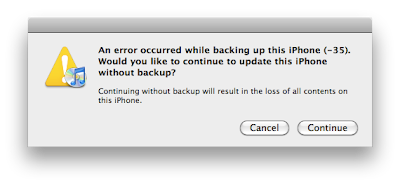


On the next run, it crashed again at 1323 MB:


Mon 28 Jun 2010 20:40:31 BST
1261 10be30bb86703bf73477870fef74387e5ceacae8
Mon 28 Jun 2010 20:41:32 BST
1269 10be30bb86703bf73477870fef74387e5ceacae8
Mon 28 Jun 2010 20:42:36 BST
1274 10be30bb86703bf73477870fef74387e5ceacae8
Mon 28 Jun 2010 20:43:36 BST
1282 10be30bb86703bf73477870fef74387e5ceacae8
Mon 28 Jun 2010 20:44:36 BST
1288 10be30bb86703bf73477870fef74387e5ceacae8
Mon 28 Jun 2010 20:45:39 BST
1295 10be30bb86703bf73477870fef74387e5ceacae8
Mon 28 Jun 2010 20:46:42 BST
1300 10be30bb86703bf73477870fef74387e5ceacae8
Mon 28 Jun 2010 20:47:45 BST
1307 10be30bb86703bf73477870fef74387e5ceacae8
Mon 28 Jun 2010 20:48:48 BST
1311 10be30bb86703bf73477870fef74387e5ceacae8
Mon 28 Jun 2010 20:49:51 BST
1311 10be30bb86703bf73477870fef74387e5ceacae8
Mon 28 Jun 2010 20:50:55 BST
1313 10be30bb86703bf73477870fef74387e5ceacae8
Mon 28 Jun 2010 20:51:55 BST
1316 10be30bb86703bf73477870fef74387e5ceacae8
Mon 28 Jun 2010 20:53:12 BST
1315 10be30bb86703bf73477870fef74387e5ceacae8
Mon 28 Jun 2010 20:54:12 BST
1316 10be30bb86703bf73477870fef74387e5ceacae8
Mon 28 Jun 2010 20:55:12 BST
1316 10be30bb86703bf73477870fef74387e5ceacae8
Mon 28 Jun 2010 20:56:12 BST
1317 10be30bb86703bf73477870fef74387e5ceacae8
Mon 28 Jun 2010 20:57:12 BST
1317 10be30bb86703bf73477870fef74387e5ceacae8
Mon 28 Jun 2010 20:58:16 BST
1318 10be30bb86703bf73477870fef74387e5ceacae8
Mon 28 Jun 2010 20:59:20 BST
1319 10be30bb86703bf73477870fef74387e5ceacae8
Mon 28 Jun 2010 21:00:23 BST
1322 10be30bb86703bf73477870fef74387e5ceacae8
Mon 28 Jun 2010 21:01:27 BST
1323 10be30bb86703bf73477870fef74387e5ceacae8
Mon 28 Jun 2010 21:02:36 BST
1323 10be30bb86703bf73477870fef74387e5ceacae8
Mon 28 Jun 2010 21:03:36 BST
1323 10be30bb86703bf73477870fef74387e5ceacae8
Interestingly, the Status.plist file in the backup directory indicates that the backup was successful
<plist version="1.0">
<dict>
<key>Backup Success</key>
<true> </true>
</dict>
</plist>


UPDATE 3: Success at last! I put the phone in flight mode, and left it running overnight without an impatient human making queries at the command line. I can't say which made the difference. Reading from the directory that the backup is being written to shouldn't upset the process, but who knows.

After the cleanly-completed backup, the directory ended up containing 1297 MB. It looks like music files aren't backed up, which is reasonable enough considering the tight pairing with iTunes. With a bit more command line hackery [2], I got a listing of what's there:


1 ASCII text
33 ASCII text, with no line terminators
1 ASCII text, with very long lines
7 Adaptive Multi-Rate Codec (GSM telephony)
37 Apple binary property list
1 GIF image data, version 89a, 320 x 480
3050 JPEG image data
18 PNG image
15 SQLite 3.x database
11 XML document text
30 XML document text
1931 data
2 empty


The 1931 data files that are opaque to the file command range in size from 168 bytes to 12.2 KB.

The .mddata and .mdinfo files are gone. Filenames are hex without an extension (e.g. 0663015d51be603f533b678e7b635eaacee052ff, 00dec425d314cb97d963bfe0796f6ea4c74e9778). There are also three interesting looking files: Manifest.plist, Manifest.mdbx, and Manifest.mbdb.

When I subsequently reconnected my iPhone, a normal incremental backup completed within a couple of minutes, and brought the total up to 1347 MB. Judging by the timestamps, it touched/created 1470 files out of a total of 10808.

I've only had a couple of minutes to play with it, but initial impressions of iOS 4 are good. The UI feels more responsive, and the message threads in the mail app work well.

GoodReader still works, so I can still gradually work my way through De Soto on the go :-)

[2] (for f in `ls`; file $f; done) > ../index.txt followed by some data cleansing with column, cut, and sed, then some aggregation with sort | uniq -c

Tuesday, 23 February 2010

The EU and the browser wars

From The Register, 19 Feb 2010:
Microsoft has unveiled its EU-mandated Web browser choice screen, and will start rolling it out next week.
The screen looks like this:


I'm no fan of Microsoft, mostly because I don't think their products are very good. Almost all of the desktops at my work run Linux, and almost all of the laptops are MacBook Pros. Like most of my colleagues, I've been using Firefox since the pre-1.0 days, and encouraging friends and family to do the same. We use lots of open source software, and contribute code back to the community.

But while many open source zealots will be celebrating this latest EU victory over Micro$oft, I'm staggered by the futility and the immorality of the imposition.

Windows users who care about web browsers are already using alternatives to Internet Explorer. Those who don't will be frustrated by this additional complexity — they want the internet to Just Work.

The EU ruling will do nothing to promote browser choice on Macs, iPhones, and iPads, where Safari is the default.

The upcoming range of netbooks running Google's Chrome OS won't even allow the use of alternative browsers.

But on the Windows desktop, Microsoft is being forced to advertise for its competitors — a victim of its own success.

How much taxpayers' money has been spent pursuing this vendetta? How many lawyers and lobbyists have been enriched by it?

One of my first posts on this blog was a review of a 1969 article by Karl Hess. He had this to say about monopolies:
To suppose that anyone needs government protection from the creation of monopolies is to accept two suppositions: that monopoly is the natural direction of unregulated enterprise, and that technology is static. Neither, of course, is true. The great concentrations of economic power, which are called monopolies today, did not grow despite government's antimonopolistic zeal. They grew, largely, because of government policies, such as those making it more profitable for small businesses to sell out to big companies rather than fight the tax code alone.
Despite the advantages that large companies enjoy in a corporate landscape laden with byzantine regulations, the story of the 21st century browser wars has beautifully illustrated Hess's point.

Without any help from the EU, Microsoft's share of the browser market fell from 96% to 63%. By building a superior product, promoted by word-of-mouth, Firefox accumulated a market share of 24%. It is a perfect example of how monopolies can be overcome without state intervention.

If the EU really wants healthy competition in the software market, it will leave it alone, resisting calls for US-style software patents.
